Small Box, Serious Work: The Case for Dell OptiPlex Micro in American Small Business
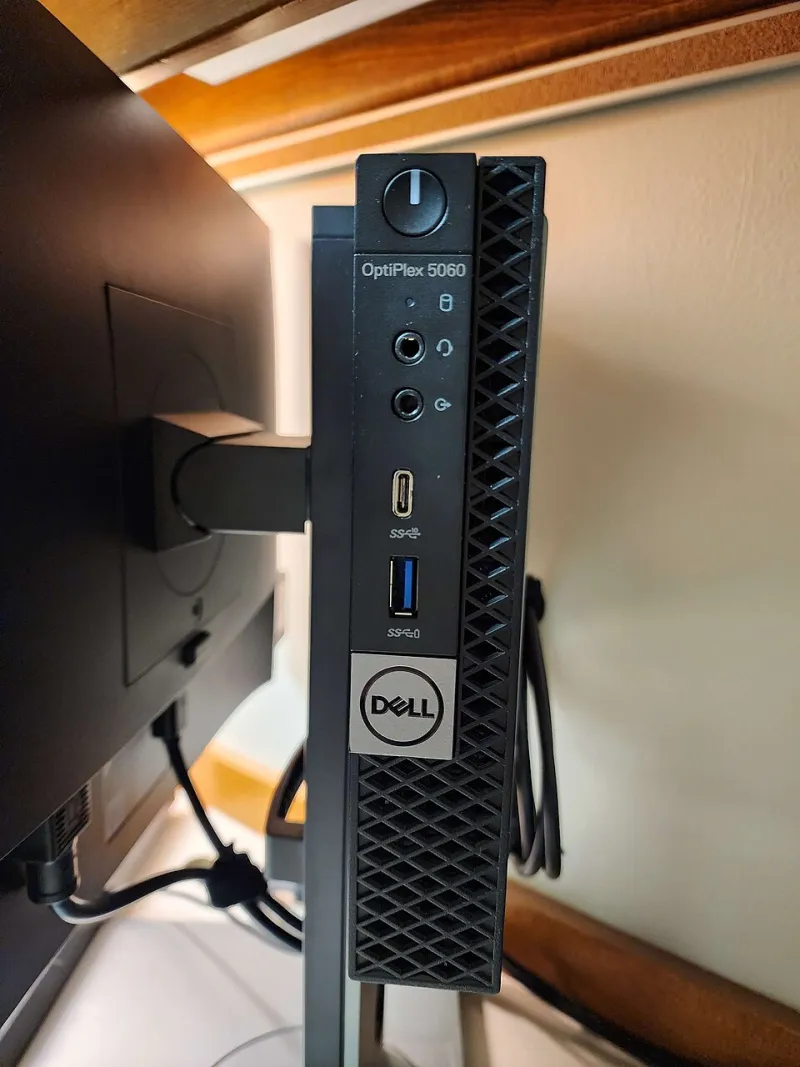
Photo: Jackpen7, CC BY-SA 4.0, via Wikimedia Commons
The computer that stays out of the way
Walk into a small clinic, a independent design studio, or a neighborhood retail office and the technology story is rarely about the desktop. The story is about the schedule, the customer at the counter, the patient in the chair, or the project due on Friday. The computer is supposed to be invisible. That is precisely where Dell's OptiPlex Micro has found a durable role in American small business.
The Micro is not a flagship. It does not compete for attention with Dell's laptops or enterprise servers. It is a small-form-factor desktop that can sit on a shelf, mount behind a monitor, or disappear into a cabinet. In 2026, that modesty is the point. For many small organizations, the right computer is not the most expandable or the most powerful. It is the one that fits the space, starts every morning, and can be supported without a dedicated IT department.
Why the small footprint matters more than it sounds
Space is a real cost in small business. A retail counter has limited depth. A clinic reception desk has to accommodate a monitor, a card reader, and paperwork without a tower crowding the workspace. A home office may share a room with a guest bed or a dining table. The OptiPlex Micro addresses those constraints directly. Its footprint is small enough to mount with a VESA bracket behind a monitor, which can turn a cluttered desk into a clean one.
That mounting flexibility is not just aesthetic. In customer-facing environments, a desktop that is out of reach and out of sight is less likely to be bumped, unplugged, or covered in paper. In a small office without a server closet, a machine that can be secured behind a display is easier to manage than a tower on the floor. The design also reduces the visual noise that can make a small business feel less professional than it is.
The supportability case
Small businesses rarely have the luxury of a deep bench of IT staff. The person who fixes the computer may also handle payroll, scheduling, or customer service. That reality favors hardware that is predictable. Dell's OptiPlex line is built around business manageability, and the Micro inherits much of that approach: standardized components, business-class warranty options, and support tools that are familiar to managed service providers.
For a small clinic or professional office working with an outside IT provider, that familiarity matters. A managed service provider that already supports Dell business desktops can image, update, and troubleshoot an OptiPlex Micro without learning a new platform. The machine is not exciting, but it is legible to the people who keep small business technology running.
Where the Micro falls short
The case for the OptiPlex Micro is strong, but it is not universal. The same small chassis that makes the machine easy to place also limits what can be done inside it. Expansion is modest. Users who need a dedicated graphics card, multiple internal drives, or a long upgrade path should look at a larger form factor. The Micro is a tool for general business computing, not a workstation in miniature.
Sustained heavy workloads also deserve caution. Small-form-factor systems trade space for thermal headroom, and a Micro that is asked to run constant compute-intensive tasks may not perform like a tower. For most clinic, retail, and office workloads, that trade-off is acceptable. For video editing, computer-aided design, or data processing, it is not. Buyers should match the machine to the work rather than assuming that small is always sufficient.
Specifying one without overpaying
The most common mistake in small-business purchasing is overcorrecting. A buyer who is worried about future needs may max out the processor and add every option, only to pay for capacity that never gets used. A better approach is to prioritize the components that affect daily experience: memory, storage, and warranty.
For most 2026 small-business deployments, 16 GB of memory is a sensible baseline for multitasking, browser-based applications, and business software. A 512 GB solid-state drive is a reasonable starting point for local storage, provided the organization has a backup and cloud strategy. The processor should be chosen for the actual workload, not for the spec sheet. Businesses that manage devices centrally should consider business-class manageability features where they fit the support model. A VESA mount is a small line item that can make a large difference in desk organization.
Warranty and support terms deserve as much attention as the hardware. A small business that cannot afford downtime should understand its repair options, response times, and whether on-site service is available in its area. The least expensive configuration is not the least expensive ownership experience if a failed machine sits等待 replacement parts for a week.
A sensible answer, not a universal one
The OptiPlex Micro is not the right computer for every small business, and Dell Experience would not argue that it is. It is, however, a sensible answer for a large share of American small-business desks: clinics that need a clean reception area, studios that need a quiet machine in a shared room, retail counters that need a reliable point-of-sale back office, and home offices that need a business-grade PC without a tower.
The grown-up computer is not the one with the most expansion slots. It is the one that fits the work, fits the space, and fits the support model. For many small organizations in 2026, that computer is a small box that stays out of the way.